

Video has become one of the strongest ranking assets on the web. You see it on search results, social media feeds, knowledge panels, answer boxes, and product pages. When your video appears with a thumbnail right inside Google Search, it instantly grabs more attention than a standard text result. But for Google to properly understand, index, and display your videos with rich results, you must give it clear, structured information. This is where Video Schema Markup plays a powerful role.
In this guide, you will learn how to add schema markup for video SEO in a simple, step-by-step format. You will understand what video schema is, why it improves your visibility, and how you can add it to your website without complications. Whether you are running a blog, an e-commerce site, a landing page, or a YouTube-embedded video, this guide will help you boost your ranking potential.
Your goal is to appear on the first page of search results, and adding video schema is one of the most reliable ways to do it. Let’s walk through each step clearly.
Table of Contents
What Is Video Schema Markup?
Video Schema Markup is a structured data format that tells Google important details about the videos on your website. You use it to describe the video title, description, thumbnail, upload date, duration, embed URL, and other attributes that help search engines understand your content.
Video Schema Markup uses the VideoObject type from Schema.org, and it is usually implemented using JSON-LD, Google’s recommended structured data format.
When Google receives this information, it can:
- Display your video with a rich thumbnail
- Show key moments or timestamps
- Include your video in the “Videos” tab
- Feature your video as a rich snippet
- Improve your overall visibility in SERPs
Video Schema Markup does not replace traditional SEO, but it enhances your ability to get discovered. It provides clarity where Google might otherwise guess.
Why Video Schema Is Critical for Video SEO?
If you want your video to appear with enhanced results, Video Schema Markup is one of the strongest tools available. Here’s why it matters:
1. Better Visibility in Search Results
Google prioritizes videos when they include clear metadata. Schema markup gives Google exactly what it needs, increasing your chances of earning a video-rich snippet.
2. Higher CTR (Click-Through Rate)
A thumbnail displayed directly in search results draws more clicks. When users see a visual element, they are more likely to choose your result instead of a plain-text result.
3. Stronger Relevance Signals
Schema markup helps Google rank your video accurately. When Google knows your video title, topic, and description, it matches it to the right user queries.
4. Improved Mobile Search Results
Video schema performs exceptionally well on mobile devices. With video-rich snippets appearing more frequently on phones, your visibility can increase significantly.
5. Better Understanding of Video Context
Google often struggles to understand video content unless you provide explicit cues. Schema markup bridges that gap.
Adding schema is not optional if you’re serious about ranking. It is one of the easiest and fastest ways to enhance video discoverability.
How Video Schema Works Behind the Scenes?
When you add schema markup to your page, Google’s crawler reads the structured data and uses it to understand what your video is about.
Here’s the process:
- Google crawls your webpage
- It detects JSON-LD structured data
- It extracts video details
- It checks whether the video is accessible and playable
- If valid, it stores the video in its index
- Your video becomes eligible for rich results
Google requires specific fields for video schema such as:
namedescriptionthumbnailUrluploadDatecontentUrlorembedUrl
If one of these is missing, your schema may not be processed correctly.
A lot of website owners skip important attributes, which causes Google to ignore the markup. With the proper setup, your video will be indexed faster and displayed with rich enhancements.
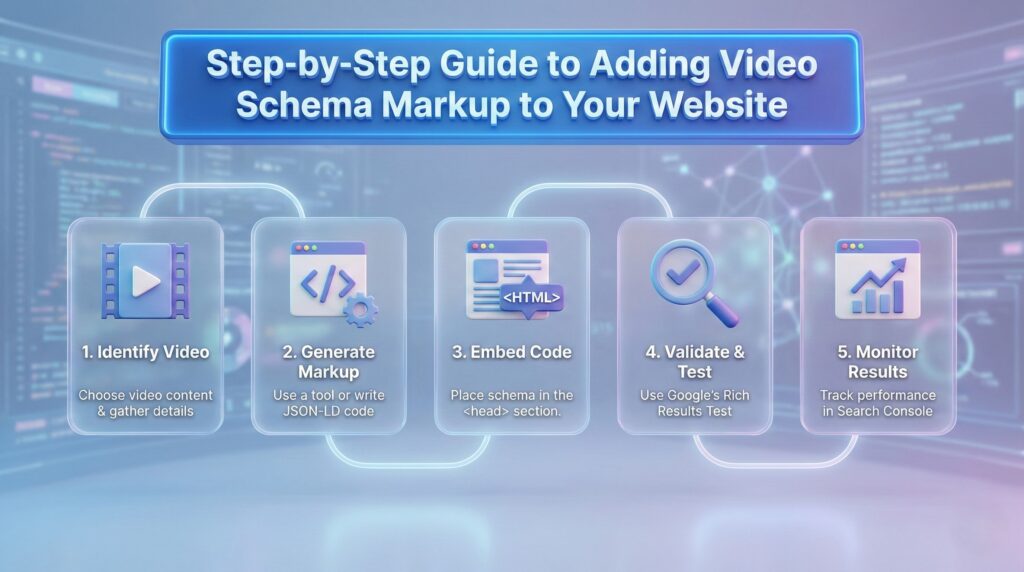
How to Add Schema Markup for Video SEO
Now let’s get into the practical part of this guide. If you want to know exactly how to add schema markup for video SEO, the following steps will walk you through everything.
Step 1: Identify Which Videos Need Markup
You don’t have to add schema to every video you post. Instead, you should prioritize:
- Videos embedded on high-value pages
- Product demonstration videos
- Educational or how-to videos
- Landing page videos
- Testimonial videos
- YouTube or Vimeo videos embedded on your website
If the video supports your SEO goals, add schema to it. This ensures your most important content gets maximum exposure.
Step 2: Gather Essential Video Details
Before generating schema markup, collect the required details:
- Video Title
- Video Description
- Thumbnail URL (must be crawlable)
- Video Duration
- Upload Date
- Video URL
- Embed URL (if applicable)
- Tags or keywords (optional)
Make sure all information is accurate. Google checks for consistency between the markup and the on-page content.
Step 3: Choose Your Implementation Method
You can add schema in three ways. Choose the one that works best for your setup.
Option 1: JSON-LD (Recommended)
This is the simplest method and is endorsed by Google.
Option 2: Microdata
Not recommended because it’s harder to maintain.
Option 3: Schema Plugins (for CMS users)
If you use WordPress, Webflow, or Shopify, plugins make your job easier.
However, manually adding schema gives you more control.
Step 4: Generate Video Schema Markup (JSON-LD Example)
Here is a clean, ready-to-use JSON-LD template:
<script type="application/ld+json">
{
  "@context": "https://schema.org",
  "@type": "VideoObject",
  "name": "Your Video Title",
  "description": "Short summary of the video content.",
  "thumbnailUrl": "https://example.com/thumbnail.jpg",
  "uploadDate": "2025-01-01",
  "duration": "PT2M30S",
  "contentUrl": "https://example.com/video.mp4",
  "embedUrl": "https://www.youtube.com/embed/yourvideoid",
  "publisher": {
    "@type": "Organization",
    "name": "Your Brand Name"
  }
}
</script>
You can copy this, edit it with your own details, and place it in your webpage.
Step 5: Add Schema Markup to Your Website
Where you paste the schema depends on your platform.
If You Use WordPress
- Go to the specific page
- Open the HTML editor
- Paste the JSON-LD in the Header or Footer area
- You can also use plugins like Rank Math or Yoast for structured data
If You Use HTML Websites
Paste the JSON-LD inside the <head> section of your page.
If You Use Google Tag Manager
- Create a new tag
- Set tag type to “Custom HTML”
- Paste your JSON-LD schema
- Trigger it on the specific page
This method helps you add schema without editing the site code.
Step 6: Test Your Video Schema
Google provides tools to validate your markup:
Rich Results Test
Helps you check if your video is eligible for rich snippets.
Schema Markup Validator
Checks for missing or incorrect properties.
Google Search Console
Shows warnings, errors, and indexing issues.
Testing is critical because even a small mistake can prevent your schema from being processed.
Step 7: Monitor Performance in Google Search Console
After implementing schema, go to Search Console and track:
- Impressions
- CTR
- Index coverage
- Rich result enhancements
- Video indexing status
You will likely see improvements in impressions and visibility within a few weeks. If your video does not appear in search results, re-index the page and check for accessibility issues.
Best Practices for Video Schema Optimization
Here’s how to optimize your structured data for maximum results:
- Always use a high-quality thumbnail
- Ensure your video is accessible via a public URL
- Keep the description aligned with the video content
- Make sure your JSON-LD matches the on-page text
- Avoid misleading or exaggerated metadata
- Keep your schema updated for older videos
- Use HTTPS URLs
- Don’t duplicate schema across unrelated pages
These small improvements can help your video rank faster.
Common Issues and How to Fix Them

Many websites make mistakes when adding video schema. Here are the most frequent issues and how you can fix them:
1. Thumbnail Not Crawlable
Use a publicly accessible URL.
2. Video Not Indexable
Ensure the video is not blocked by robots.txt.
3. Missing Required Fields
Check that name, description, thumbnail URL, upload date, and URL are included.
4. Incorrect Duration Format
Use ISO 8601 format (example: PT3M10S).
5. Schema Added but No Rich Results
Sometimes Google takes time to display enhancements. Monitor Search Console.
Tools You Can Use to Simplify Schema Implementation
- Google Search Console
- Google Rich Results Test
- Schema Markup Validator
- JSON-LD Generators
- Rank Math Plugin
- Yoast SEO
- WordLift
- Video SEO tools
These tools speed up schema creation and help you avoid formatting errors.
FAQs
1. What is VideoObject schema?
It is a structured data type used to describe videos for search engines.
2. Does schema guarantee rich results?
Not guaranteed, but it significantly improves eligibility.
3. Can I add schema for YouTube videos?
Yes, you can add schema for embedded YouTube videos on your website.
4. How long does Google take to process schema?
Usually a few days to a few weeks.
5. Does schema help overall SEO?
Yes. Better understanding = better visibility.
Conclusion
Adding video schema markup is one of the most effective ways to increase your visibility in search results. It helps Google understand your content, improves your ranking potential, and makes your video eligible for rich features that attract more clicks.
Now that you know how to add schema markup for video SEO, you can start optimizing your videos with confidence. When you consistently add accurate and structured data, you help Google discover, index, and rank your videos faster. Use the steps in this guide, test your schema, and monitor your results — you will see the improvement over time.


